How to Delete a Stripchat Account
You can start deleting a Stripchat user account through Settings and Privacy → Delete Account. Before confirming, check subscriptions, automatic token purchases and any records you need to keep. Closing access to an account, cancelling a renewal and requesting deletion of personal data are related decisions with different results.
Stripchat’s deletion guide describes immediate account inactivity followed by permanent deletion after 18 months. It also describes reactivation before permanent deletion. That makes it important to understand what you want: to stop using the service, stop future payments or ask for particular information to be erased.
For someone using Stripchat in India, the same distinction applies to payment records. Deleting a website account should not be treated as removing a bank transaction, resolving an unexplained charge or changing a payment provider’s own records.
The steps to delete your Stripchat account
The official account-deletion guide gives the following route for user accounts:
- Open the account menu and go to Settings and Privacy.
- Select Delete Account in the top-right corner.
- In the pop-up, optionally give a reason.
- Read the confirmation and select its checkbox if you intend to proceed.
- Select Do It to confirm the deletion action.
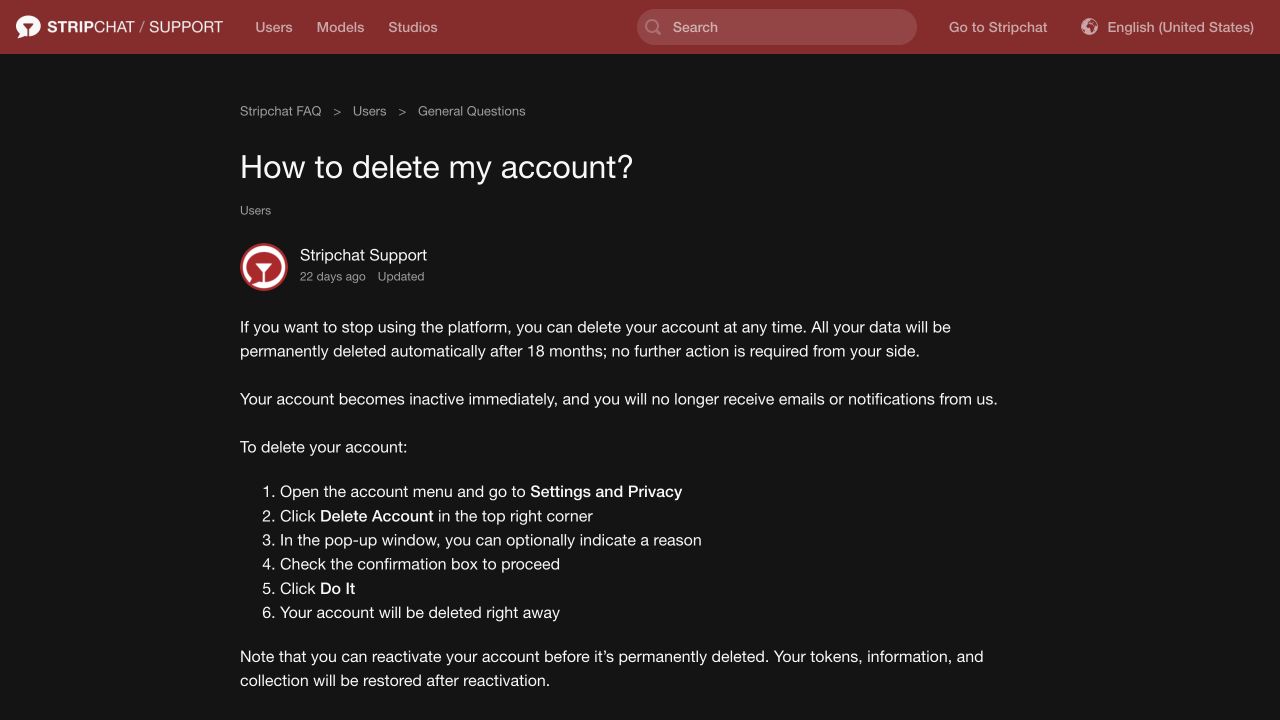
Make sure you are in the account you intend to close. Read the confirmation shown to you, particularly if you have a balance, purchased content or an unresolved payment issue. If the information on the screen differs from what you expected, ask support before confirming.
Keep any confirmation or case reference you receive. Being signed out is not, by itself, a complete record of what happened; a session can end for other reasons. Record the account identifier and the date of your action privately so that you can describe it accurately if you need help later.
These are the published user-account steps. Model and studio arrangements have separate help articles and responsibilities, so a creator should use the instructions for their own account type rather than assume this viewer-account route covers it.
What to check before confirming deletion
Gather the information you may need while you can still see the account. There is no reason to rely on future reactivation merely to recover a receipt you could keep now.
| Check | Why it matters |
|---|---|
| Token balance and purchase records | You may need them to explain a missing credit, balance question or refund request. |
| Auto-Refill | Review whether automatic top-ups remain enabled before closing access. |
| Memberships and Fan Clubs | Check each arrangement’s renewal and cancellation state. |
| Pending payments or disputes | Preserve receipts, references and the bank or provider’s actual status. |
| Account access and registered email | Keep a genuine way to receive any necessary support reply. |
| Privacy request | Decide whether you want account closure, information about retained data or erasure of particular records. |
Save only what you need and store it somewhere private. A record for a payment query does not need to include every unrelated purchase on a bank statement. Keep original receipts, and use a redacted copy if you later need to explain one transaction.
If your immediate concern is unauthorised spending, report the payment promptly through the bank or provider’s genuine channel. Do not make completion of deletion a condition for reporting it. Our unauthorised-charge guide explains which records can help.
Cancel future payments through their own controls
Review automatic purchases and subscriptions before you remove easy access to their settings. Confirm the status of each arrangement rather than assuming the deletion button supplies every cancellation result you need.
Stripchat’s Auto-Refill article describes automatic purchases when the balance runs low, using the last manually purchased package and payment details. Its control is in Settings and Privacy → Balance Auto-Refill, and availability depends on the payment method. Turn it off if you want to stop that feature, then check the resulting state.
For Ultimate, the cancellation guide directs users through My Profile → My Subscriptions → Ultimate membership → Cancel Membership.
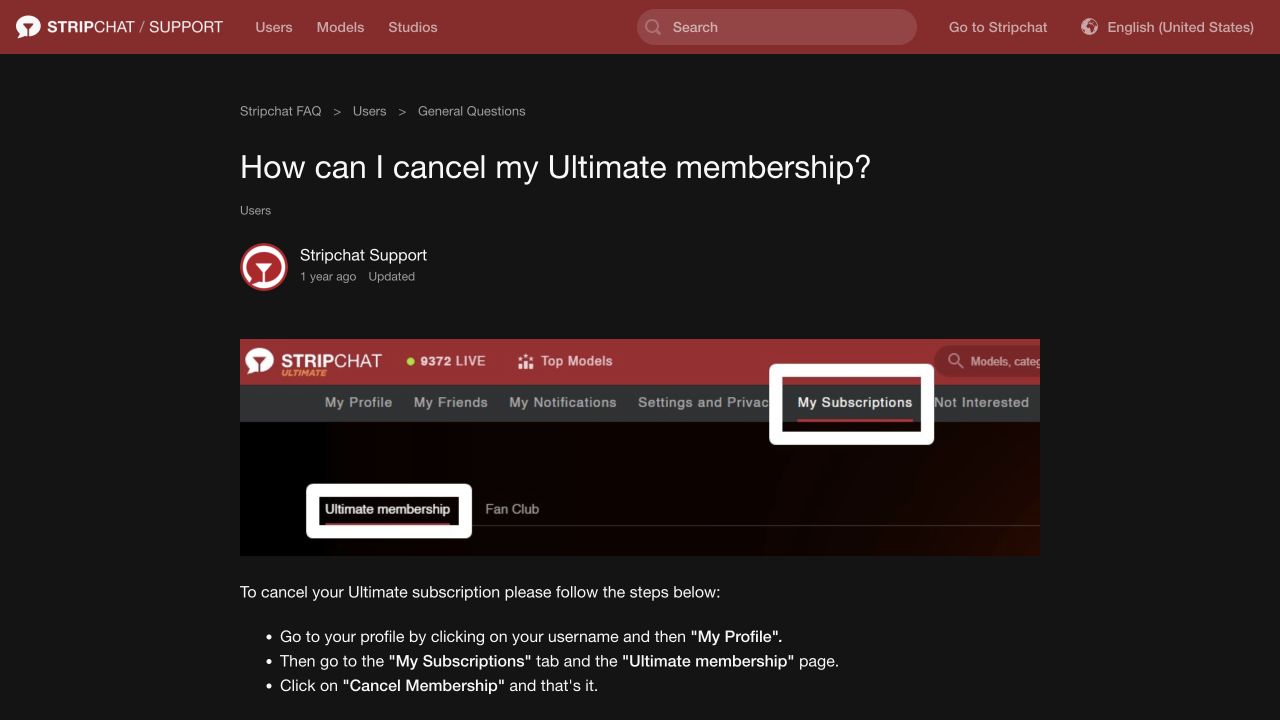
Review any Fan Club arrangement as well. Use the actual subscription record to check whether it renews, when another payment is expected and whether cancellation has completed. Do not assume the status of one membership explains the status of another.
The recurring-payment guide covers these controls together. If a bank or provider also shows a recurring authority, check its scope and status through that provider’s genuine interface. A website cancellation and a bank-side control should not be assumed to answer exactly the same question.
If you already deleted the account and are unsure about future charges, ask support about the specific arrangement and contact the relevant payment provider where necessary. Keep the deletion date and any cancellation record. Do not send another payment to someone who claims a fee is required to complete cancellation.
What happens to unused tokens?
The deletion help says tokens, information and collection content are restored on reactivation before permanent deletion. That describes a restoration path; it does not say an unused token balance is automatically paid back to your card or bank account.
If a purchase or refund question matters to your decision, raise it before deleting and retain the receipt. Do not spend tokens merely to empty the balance, especially if you intend to ask about an unused purchase. Explain what you bought, what remains and what outcome you want considered.
Stripchat’s terms contain separate forfeiture clauses for termination following a breach and for an inactive account being terminated. Those clauses should not be casually rewritten as a promise that every voluntarily deleted account loses its entire balance immediately. Equally, they are a reason not to treat an unused balance as guaranteed permanent storage.
Our refund-policy guide explains purchase refunds and token-related complaints as separate processes with conditions. Deletion itself is not a refund application, and a refund request is not proof that deletion or cancellation has completed.
Immediate inactivity, 18 months and reactivation
The deletion guide says the account becomes inactive immediately, emails and notifications stop, and permanent deletion happens automatically after 18 months. It permits reactivation before permanent deletion. Do not read the immediate account action as confirmation that all stored records disappeared at that moment.
The separate restoration guide describes signing in, choosing Restore My Account and following a restoration link sent by email. If the link is invalid or expired, it directs users back through that process.
That older restoration article also uses broad “any time” wording. Read it alongside the permanent-deletion limit in the deletion guide, rather than as a promise of recovery forever. Check the account’s actual state and ask support if the available screen or timing is unclear.
If your goal is to leave the account inactive, do not select a restoration control simply to inspect it. Keep your deletion and support records outside the account. If you deliberately reactivate, review subscriptions, payment settings and security choices again instead of assuming every setting has the state you want.
For a forgotten password or inaccessible registered email, see account recovery. That guide concerns establishing access; it does not guarantee that a permanently deleted account can be restored.
Account deletion and personal-data erasure
The privacy policy describes purpose-based retention, including legal, accounting and dispute needs, and qualified erasure requests. Its section 18 says future use after deletion requires a new account without previously saved information. That does not fully match the help centre’s reactivation description.
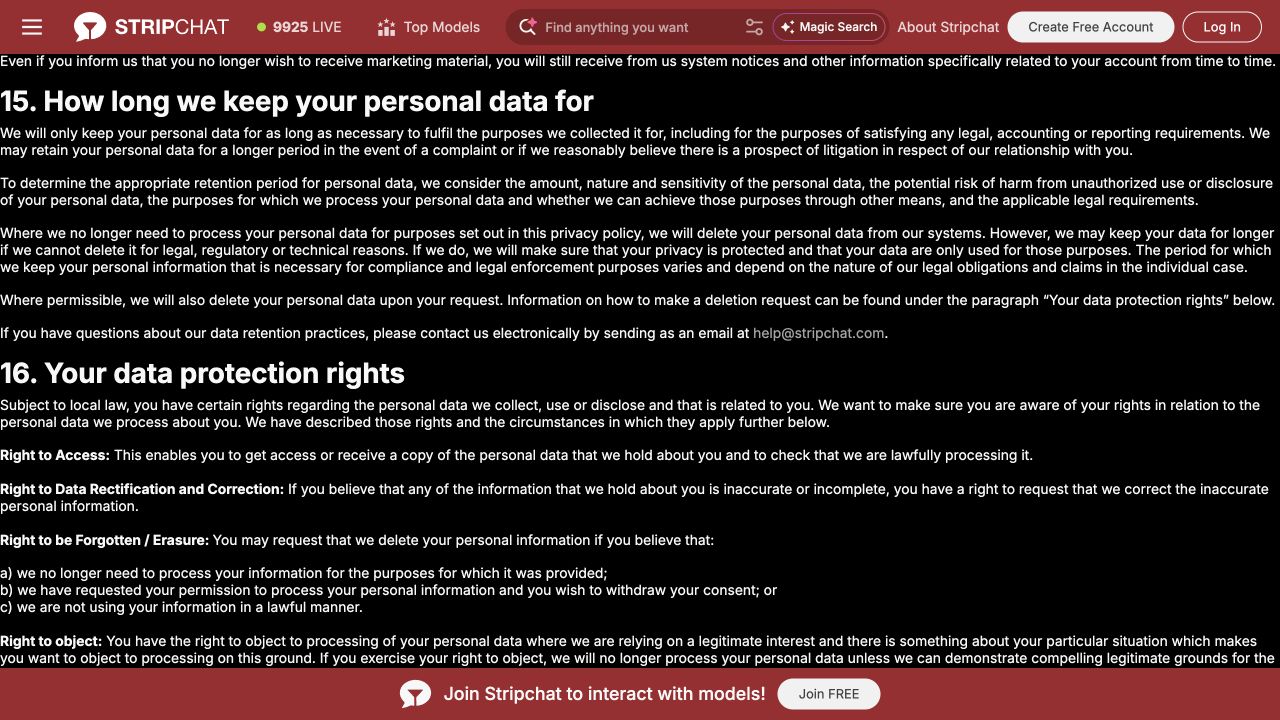
The documents therefore leave important questions to clarify. The help centre gives an 18-month permanent-deletion timetable, while the privacy policy allows longer retention in certain circumstances. Ask which records the timetable covers and what, if anything, must be retained separately.
If your decision depends on recovering a balance or removing a specific category of information, get an answer about that category before relying on one broad sentence. Access to an account, the ability to reactivate and the retention of a transaction record are different things.
You can make a focused data request without guessing that every record must have the same outcome. Identify whether you are asking about profile details, correspondence, verification information or purchase records, and state the action you want considered.
For the wider data-handling picture, read our Stripchat privacy review. A website policy is useful for understanding the stated process; it does not prove that a particular person’s records have already been erased.
How to ask about deletion of your data
The privacy policy gives help@stripchat.com for data-protection requests and says additional information may be needed to verify authority. Rights and conditions depend on applicable law; an Indian reader should not assume every EU-specific procedure applies automatically.
Keep the request clear and separate from any payment dispute. For example:
Please confirm the status of my account closure and explain which personal-data categories can be erased, which must be retained and the applicable retention criteria. Please also clarify whether the 18-month timetable in the account-deletion guide covers the records relevant to my account.
Identify the account through the genuine channel and follow a legitimate secure verification process if needed. Do not put passwords, live authentication codes or authenticator setup keys in the message. Ask why a requested document is needed before supplying sensitive information.
Keep the acknowledgement and response. If the answer concerns only account access, ask separately about the data categories you named. If some records remain, ask for their purpose and retention criteria rather than assuming that an incomplete erasure response means nothing at all was removed.
Bank records, email and copies outside the account
Closing a website account does not give you control over every copy of information elsewhere. Your bank can still have transaction records, a payment provider can have its own records and receipts can remain in your mailbox or downloads folder.
Decide which local copies you need to keep for reconciliation or an ongoing issue, then store them privately. Removing a browser shortcut or deleting an email is not evidence that the website account has been closed. Conversely, closing the account does not remove a file you already saved to a shared folder.
The privacy policy also warns that public submissions can be copied or remain outside your control. If your concern is a particular published item, identify it in a separate removal request. Do not assume account deletion recalls everything another person may already have kept.
If an unfamiliar message arrives after closure, identify its source and purpose. A bank alert, an ongoing support reply and a promotional message are different situations. Reach the relevant service independently rather than following an unsolicited “finish deleting your account” link.
If you cannot find Delete Account or cannot sign in
Use the genuine help centre to describe the problem. Give the account type, the screen you can reach and any error text. A missing option should not be solved by giving a stranger control of the account or paying an unofficial deletion service.
If you cannot sign in, establish whether the obstacle is a password, mailbox, second factor or an access restriction. The recovery guide helps you prepare that explanation. Tell support that your desired outcome is closure if you do not want to resume ordinary use.
For suspected compromise, protect the registered email and report unexpected changes as well. Deleting an account should not be treated as replacing an exposed password on other services, securing a compromised phone or reversing a payment. Our account-security checklist covers those tasks.
A final check after closure
Keep your closure record, any renewal-cancellation confirmations and any open support references together. Match later payment activity with its actual transaction date and reference rather than assuming that the date it appeared on a statement tells you when it was initiated.
If a future payment remains unclear, ask about that specific charge and arrangement. Use the bank or provider’s reporting process for a payment you did not authorise. If a privacy question remains, follow up on the named data category through the data-request channel.
The useful evidence is a clear record of each result: the account’s closure state, the subscription’s cancellation state and the response about retained data. One confirmation should not be expected to stand in for all three.
Frequently asked questions
Where is the Stripchat account-deletion option?
The user-account help guide places it in Settings and Privacy, at the top right. It describes an optional reason, a confirmation checkbox and the Do It button. Read the confirmation for the intended account before proceeding.
Is permanent deletion immediate?
The help guide describes immediate inactivity and automatic permanent deletion after 18 months. The privacy policy contains retention conditions and different wording about future account access, so clarify any specific record or restoration concern with support.
Will deleting the account refund my unused tokens?
Deletion is not a cash-refund request. The help article describes restoring tokens on reactivation before permanent deletion. Ask about any purchase refund separately and keep the relevant records.
Should I cancel subscriptions before deleting?
Review each recurring arrangement and confirm its cancellation state before closing easy access to the controls. Keep confirmations and ask support about any remaining uncertainty. Do not use deletion alone as your cancellation record.
Can I request erasure without assuming everything disappears together?
Yes. Specify the relevant personal-data categories and ask what can be removed, what must remain and why. The privacy policy describes qualified requests; it does not promise one unconditional outcome for every record.