Stripchat Hindi Support
Stripchat’s support widget offers हिंदी in its additional language menu under MORE. That is a useful starting point for someone who would rather explain an account problem in Hindi. It should be understood as a language choice in the support flow, rather than a promise that the entire website, every payment page and every staff reply will be in Hindi.
Several different language decisions can appear during one visit: the website interface, the help article, the support bot and a payment provider’s screen. Changing one does not necessarily change the others. The practical goal is to understand the action you are taking and keep the important account and transaction details intact.
For readers in India, being offered Hindi also does not establish a local support office, a dedicated phone number or a different refund policy. Use the genuine contact route and ask about language availability for the particular issue you need resolved.
How to choose Hindi in the support widget
Start at the official Support Center. Open the relevant help topic and select Contact Support at the bottom of the page. In the widget’s language menu, open MORE and choose हिंदी if it is offered in your session.
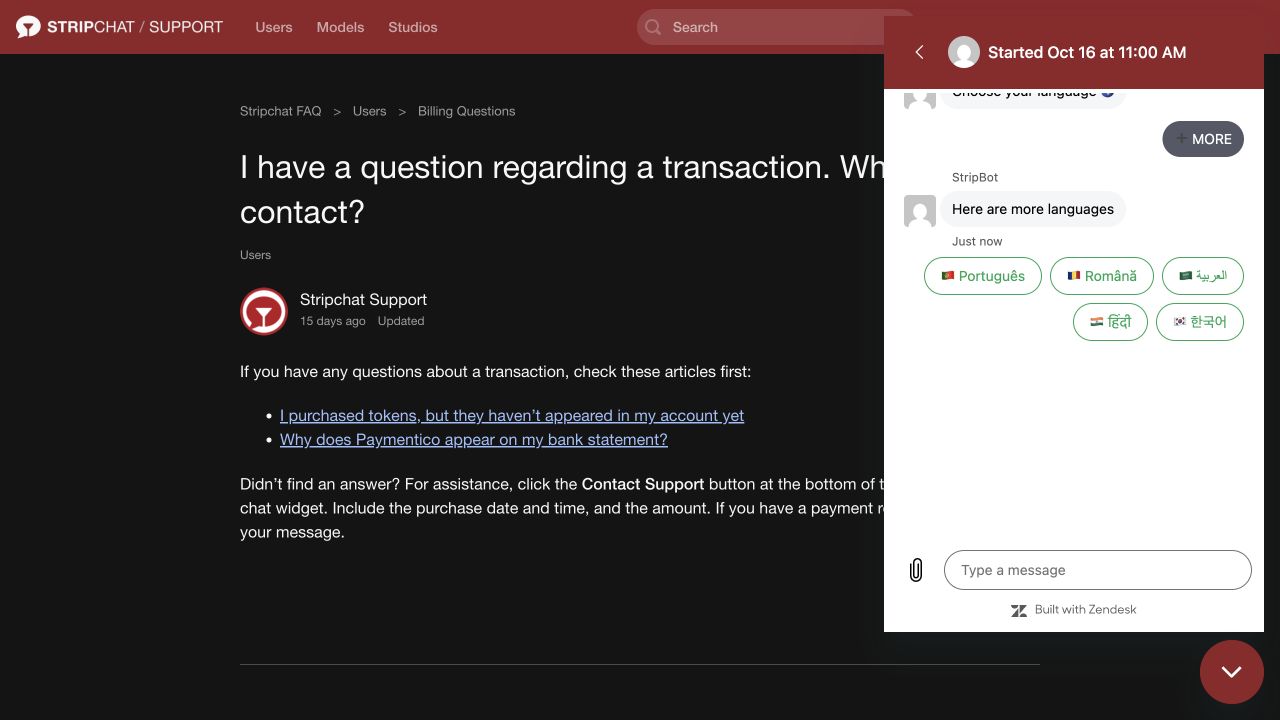
Read the next prompt before entering the explanation. If the conversation is automated, distinguish a bot response from a staff member’s answer. A language selection or acknowledgement is not confirmation that someone has investigated an account or payment.
If the conversation later changes language, ask whether you can continue in Hindi or whether an English summary would help. Keep any case reference when moving between prompts or support routes. The India customer-support guide explains the broader contact process and the records to prepare.
Do not use a WhatsApp or Telegram contact merely because it advertises Hindi support. Find the contact through the genuine service or payment provider, rather than treating the language of the greeting as proof of affiliation.
Website language, help language and staff replies
The website’s interface and the help centre are separate surfaces. Use the language control on the page you are actually reading and check what changes after selection. A translated navigation label is not evidence that every notice, account message or embedded checkout has also changed.
The help centre has its own language selector. Its list should be checked separately from the support widget’s language options.
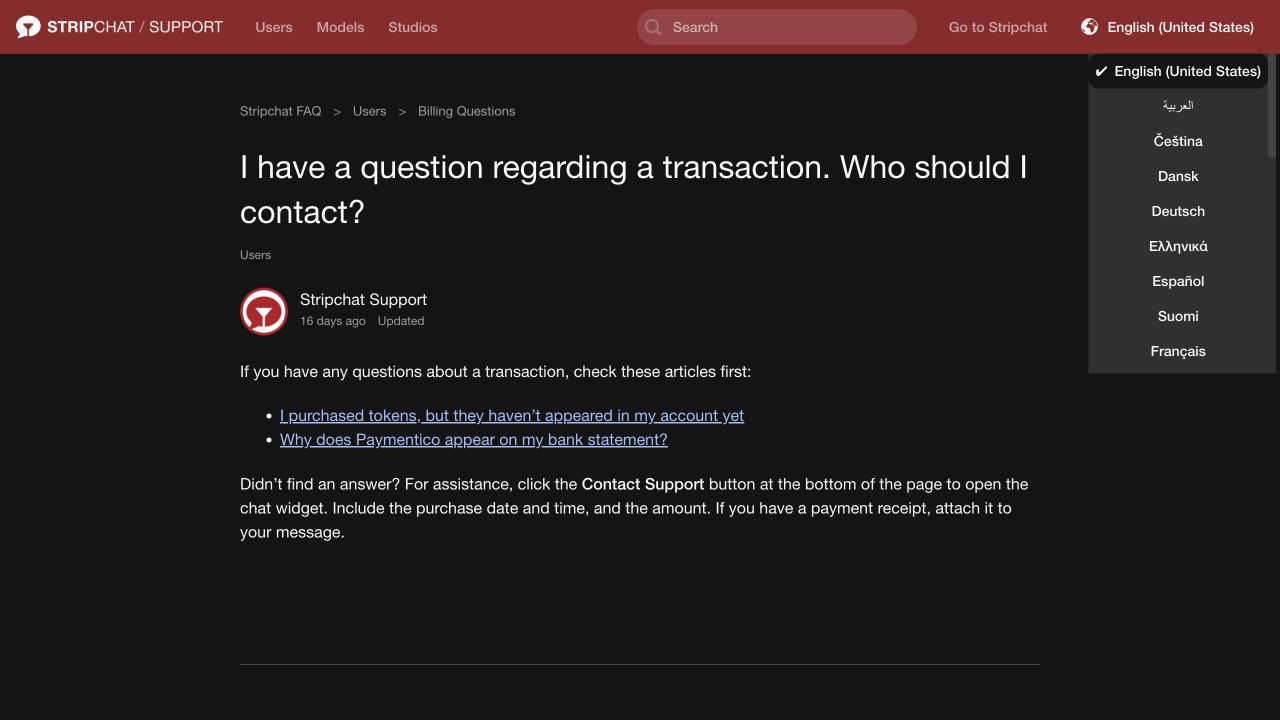
If Hindi is not offered for a particular article, keep the original article available and use a translation aid carefully. Choosing a language in the bot should not be expected to create a translated copy of every help document.
A staff conversation introduces another question: can the person or process handling this case communicate in Hindi? Ask that directly. A Hindi option in an automated menu does not establish round-the-clock Hindi-speaking staff, an immediate response or a Hindi-language answer from an external billing provider.
The distinction is especially useful when an issue is handed off. Stripchat support, a payment processor and a bank may each have their own language options and case references. Take the relevant information with you rather than assuming one menu controls all three organisations.
Using browser translation without losing meaning
Chrome’s translation guidance explains how to translate pages and select a preferred language. If your browser offers Hindi translation, it can help with an explanation or a long help article. Browser translation and a publisher-provided Hindi version are different things.
Keep the original wording for messages that identify a decision or payment status. You can read a translated explanation while retaining an original screenshot or short excerpt for support. This avoids having to reconstruct an error from a translation that uses different terminology.
Be particularly careful with numbers, negatives and conditions. “Not completed”, “not eligible” and “not yet processed” describe different situations. A translated sentence should not be used to assume that a pending payment has failed or that a refund request has been approved.
Do not submit a payment, cancellation or data-deletion action until its meaning is clear. If a translated button or confirmation is ambiguous, return to the original text and ask for clarification. Changing the reading language does not change the amount, recipient or consequences of the action.
Keep passwords, OTPs, reset links and authenticator setup keys out of translation tools and support messages. For a general explanation, remove unnecessary personal details before using an external translation service.
Payment terms worth keeping in the original form
Payment pages can involve a separate provider, so the language and labels may differ from the website. Use the actual wording shown for your transaction. The following are common distinctions to recognise, rather than a promise that every processor uses these exact labels.
| Term or record | Why the distinction matters |
|---|---|
| Pending | The transaction may still be awaiting a final status; it does not by itself confirm failure or refund. |
| Completed | Identify which service shows completion; a payment record and a token credit are separate records. |
| Declined | Keep the provider’s exact result and reference instead of translating it into a general site error. |
| Hold | A reserved amount should be distinguished from a settled payment or money already returned. |
| Token History | This account record helps establish whether a matching token credit appears. |
| Refund requested | A request is different from approval and from the funds reaching the payment account. |
For a payment question, preserve the amount, currency, transaction reference and provider name exactly. If the amount is in INR, do not replace it with an approximate conversion when explaining the original purchase. An estimate can be discussed separately, but it should not obscure the actual charge.
Include a time zone with dates and times. “16 October, 21:15 IST” is easier to interpret across support systems than “last night”. Copy reference numbers carefully and avoid translating usernames or identifiers into different characters.
The India payment-method guide explains availability, while the missing-token guide covers comparison of payment status and Token History. Language preference does not establish which payment methods are available to an account or whether a purchase is refundable.
Preparing a clear request in Hindi
Begin with one sentence saying what you need help with. Then identify the account or event and state what you want checked. Short sentences make it easier to preserve meaning if the request is translated or passed to another team.
Stripchat’s transaction-support instructions ask for the purchase date, time and amount, with a receipt if available. For a payment case, add the relevant reference and current status to explain the issue clearly.
For an access problem, say whether you can still use the registered email and what error appears. For a moderation decision, include the decision reference and the point you want reviewed. Avoid sending unrelated documents merely to make a request look more complete.
A short opening message could be:
नमस्ते, क्या मुझे इस समस्या के लिए हिंदी में सहायता मिल सकती है? मेरा यूज़रनेम [username] है। समस्या: [समस्या का संक्षिप्त विवरण]। तारीख और समय: [date/time, IST]। संदर्भ संख्या: [reference, यदि उपलब्ध हो]। कृपया अगला कदम बताएं।
In English, this asks whether Hindi assistance is available, identifies the username and problem, provides the time and any reference, and asks for the next step. Replace the brackets with your own facts and omit fields that do not apply.
You can add an English summary if useful, but keep the two versions consistent. If you correct a date or reference, make the correction clear rather than leaving contradictory versions in the conversation. Do not claim that a payment was unauthorised if the actual issue is a purchase you approved but have not received.
Questions to ask before sharing more information
A useful support reply should make the next action understandable. If it does not, ask a specific question rather than agreeing to a step you cannot interpret:
- Can this issue continue in Hindi, or should I provide a short English summary?
- Which account, transaction or case reference are you asking about?
- Is the next step information gathering, an appeal, a payment action or a cancellation?
- Which details are necessary, and through which secure process should they be supplied?
- How will I recognise the confirmation or outcome?
For an appeal or account restriction, follow the decision’s genuine route rather than asking an unrelated agent to remove it. The suspension and appeal guide explains those distinctions. For recurring payments, the cancellation guide helps separate a question about cancellation from confirmation that renewal has stopped.
A fluent Hindi reply is not evidence that the sender is authorised. Be cautious if someone asks for an advance fee, banking codes or remote access while claiming to translate or speed up support. The scams guide covers those patterns.
When a reply remains unclear
Keep the original response and identify the sentence or instruction you do not understand. Ask what it means for your case: whether a payment is still pending, whether more evidence is required or whether a decision has been made.
If support directs you to a processor, use the provider associated with the actual purchase. Explain the existing case and keep the references from both services. A change of contact channel is not confirmation that a payment has been refunded or that an account restriction has ended.
If a language barrier prevents you from understanding an important confirmation, pause that action. You can ask for simpler wording or help with a specific sentence without disclosing account secrets. Preserve the original terms and records so that a later explanation can be checked against what the service actually displayed.
Frequently asked questions
Does Stripchat offer a Hindi option in support?
The support widget’s additional language menu includes हिंदी. Use it where offered and clarify whether Hindi assistance is available for your particular issue.
Does that mean the entire website is in Hindi?
No such conclusion follows from the bot menu. Check the website, help article and payment page separately, because their language controls and available translations can differ.
Can browser translation replace a clear payment confirmation?
Use translation to help read the text, while retaining the original amount, currency, reference and conditions. Ask for clarification if an action or status remains ambiguous.
Should I translate my username and transaction reference?
Keep them exactly as shown in the account or receipt. Translate the explanation around them, preserving numbers, dates and the time zone.
Is a Hindi-speaking support contact on WhatsApp genuine?
Language alone does not establish affiliation. Verify the contact through the official service or the actual payment provider before sharing account-specific information.