Stripchat Account Security
A secure Stripchat account needs more than a password that is difficult to guess. Your recovery email, the phone holding your authentication codes and the pages where you enter those details all affect who can get in. Protecting one part while overlooking another can leave a route into the account.
Start with a unique password, secure the connected mailbox and enable the available two-factor authentication feature. Then make sure you know how you would recover access if you lost your phone or could no longer sign in. Doing that while everything works is easier than making decisions during a suspected compromise.
For users in India, the account precautions are separate from the bank’s payment protections. If money has been taken without your permission, secure the website account and report the payment through the bank or provider’s genuine route. One action should not wait for the other to explain the whole incident.
Your Stripchat security checklist
Work through the access points you actually use. A control is useful when you understand what it protects and can recognise whether it is active.
| Area | What to check |
|---|---|
| Password | A unique secret saved securely, with no reuse across other accounts. |
| Recovery email | You control the mailbox, its recovery options and available sign-in protections. |
| 2FA | Setup is complete and the authenticator entry belongs to the correct account. |
| Phone or computer | Screen lock, software updates and access limited to people you trust. |
| Sign-in destination | You reached the genuine website yourself before entering credentials or codes. |
| Recovery plan | You know which official route to use if the password, mailbox or phone becomes unavailable. |
Treat this as a routine account review rather than a one-time ritual. A new phone, a shared computer or a changed email address can alter the situation even when the website password stays the same.
Use a unique password and store it safely
CISA’s online-security guidance recommends strong passwords, a password manager, multifactor authentication and recognising phishing. For a Stripchat account, the practical starting point is a password you have not used anywhere else.
A small variation on an old password is a weak compromise. If another account is exposed, changing a number or adding the site’s name gives you less separation than generating a new random password within the website’s accepted rules. Let a password manager handle the complexity instead of making the secret easy to remember by making it predictable.
Check the website address before filling a password, including when you use a manager. A familiar logo is not enough. Keep the password manager itself protected, and avoid storing its recovery information in a place accessible to the same people you want to keep out of the account.
If a password has been exposed or reused on an affected service, replace it through the genuine account settings or recovery flow. Update other accounts that used the same secret. Changing only the Stripchat password leaves the reused copies elsewhere unchanged.
Protect the email account used for recovery
Your mailbox can be an access route as well as a place where receipts arrive. Someone who can read recovery messages may be able to interfere with attempts to regain the account, even if they did not initially know the Stripchat password.
Review the email provider’s own security settings. Check available multifactor authentication, recovery information and any unfamiliar access. If the provider offers forwarding rules, filters or connected-app controls, review those too: changing a mailbox password should not be your only question when an unexpected rule could redirect messages.
Keep account recovery details distinct from public profile information. There is no reason to share the login email in a chat to prove that you own an account. When support needs to establish ownership, use its genuine process and provide only the information relevant to that request.
If you suspect that the email account itself is compromised, use a trusted device to secure or recover it. Tell Stripchat support if you no longer control the registered address. Do not assume that repeatedly requesting password emails to an inaccessible mailbox will resolve the underlying problem.
Enable Stripchat’s two-factor authentication
The Stripchat 2FA guide places the control in Settings and Privacy → Two-Factor Authentication, beneath My Password. It describes using Google Authenticator and requesting a code when a suspicious login is detected.

The documented setup asks you to confirm your password, link the authenticator using the displayed QR code or setup key, then confirm with a generated code. Follow the instructions shown in your account and check that setup completes. Opening the panel or installing an app alone does not establish that protection is enabled.
Keep the QR code and setup key private. They are not ordinary screenshots to attach to a help request. Anyone helping you troubleshoot can be told what error appeared without being given the secret used to generate authentication codes.
The suspicious-login wording should not be read as a promise that a code appears on every visit. Equally, having 2FA enabled is not a reason to share a password or approve an unfamiliar request. Enter a code only in the genuine sign-in or setup flow you intended to use.
Plan for a new or lost authenticator phone
Before replacing, resetting or trading in a phone, establish how your authenticator entries will remain available. Do not discover after wiping the old device that the password was only one part of the sign-in process.
Google’s current Authenticator guidance describes synchronisation through a Google Account and manual transfer for codes used without one. Manual transfer requires the old device with its codes. These are app features; they are not a promise that Stripchat support can recreate a missing authenticator entry.
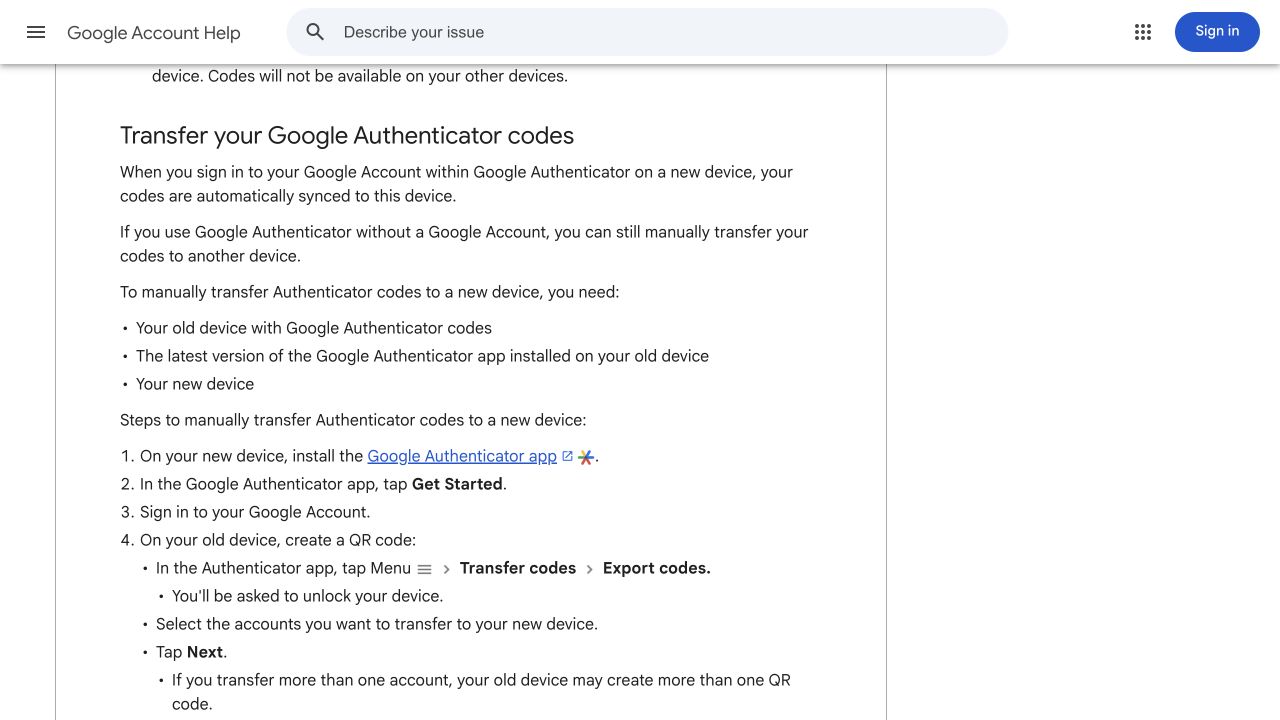
Check which arrangement you actually use. Do not assume that installing the app on a new phone restores every entry. Keep the old device available until you have confirmed the intended transfer or sync result through the app’s official instructions.
If you sync codes, protect the Google Account involved as well. If you use the app without an account, understand the transfer requirements before the old device becomes unavailable. Avoid sending an export QR code to another person or saving it casually in a shared folder.
The Stripchat help article still says Google Authenticator works on only one device. Google’s documentation describes current sync and transfer options, so use the app provider’s instructions for device planning. This distinction prevents an old app description from becoming your recovery plan.
If the phone is already lost and no valid authenticator entry is available, contact Stripchat through official support. Explain that the second factor is unavailable. A password reset should not be assumed to remove the second-factor requirement, and a stranger offering an instant bypass is not a recovery route.
If an authentication code is rejected
First check that you selected the entry for the intended account and are using its current code. A code for another service or another Stripchat account will not solve the prompt in front of you. Recheck the sign-in address before continuing, especially if the prompt arrived through an unexpected message.
Google’s Authenticator documentation notes that current versions use the operating system’s time setting. Review the device’s date and time if codes repeatedly fail, and follow the app’s current troubleshooting guidance. Avoid searching for an obsolete in-app time-correction menu as though every version must contain it.
Stripchat’s guide describes a temporary block after repeated incorrect attempts. Stop guessing if the problem continues. Keep a record of the error text and when it occurred, then use support to clarify the issue without sending your password, setup key or live authentication code.
Recover a forgotten password through the official flow
Stripchat’s password-recovery guide directs users to its reset flow with a username or registered email. It advises signing out of other Stripchat accounts first and checking Spam if the recovery email is missing.

Start from the genuine website or its help centre yourself. If you have several accounts, take care to request recovery for the one you mean to restore. Sending a reset request is not the same as completing the reset, so follow the resulting process and store the new unique password securely.
The guide identifies the recovery sender as noreply@account.stripchat.com. Treat that as a reference, not proof that an unexpected message is authentic. A copied sender name or logo does not establish that a link leads to the correct destination.
If you requested the email and cannot find it, check the registered mailbox and Spam folder before creating more requests. If you cannot access the mailbox, or the account’s details appear to have changed, explain that problem to support rather than assuming an ordinary forgotten-password flow covers it. Our Stripchat account-recovery guide helps identify the obstacle and prepare a clear support request.
Recognise a suspicious message before entering a code
A convincing message may say that the account will be suspended, a payment needs verification or a refund requires immediate action. Urgency is a reason to slow down and reach the service independently. Do not let a deadline in a chat decide where you enter a password.
Be cautious when a person asks you to send a login code, share your screen during authentication, install a remote-access tool or scan a QR code to “verify ownership.” A code can authorise an action while it is valid, and a setup QR code can contain an authentication secret. Neither belongs in an ordinary conversation.
Navigate to the known website and check the relevant account or support route there. If an issue is genuine, you can describe it without following the message’s embedded sign-in link. Our Stripchat scams guide covers fake support, token offers, recovery fees and reporting suspicious contacts. Keep a copy of a suspicious message if it is relevant to an investigation, but do not forward secret reset links or codes to someone offering help.
What to do after suspected account access
An unsolicited reset email, an unexpected settings change and an unfamiliar payment are different signals. A reset email alone does not prove someone signed in. Still, it is sensible to review the account through a trusted route and act on the evidence you can identify.
- Use a trusted device. If you suspect the current device is compromised, do not keep entering new credentials on it.
- Secure the recovery email. Review its access and recovery options, alongside restoring control of the website account.
- Replace an exposed password. Use genuine settings or recovery and update any other account that reused it.
- Review the available account controls. Check security settings and account details. If session or device controls are offered, review unfamiliar access; otherwise ask support about invalidating existing sessions.
- Preserve relevant records. Note unexpected changes, error messages, dates and transaction references.
- Report unauthorised payments promptly. Use the bank or provider’s own route while the account issue is being addressed.
Ask explicitly whether existing sessions remain active after a password change. Do not assume a password reset has signed out every device or reversed an account change. If an authenticator secret may have been exposed, raise that specific concern with support through the secure account process.
For a concise report, describe what happened, what access you still have and which changes you did not make. Redact unrelated details from screenshots. Do not send passwords, authentication secrets, card PINs or banking OTPs in a support message.
Our guide to unauthorised Stripchat charges covers payment reporting and records. Restoring a website login does not itself investigate or reverse a bank transaction.
Shared devices and privacy need separate attention
On a shared computer, sign out when finished, check whether credentials were saved and close the mailbox used for recovery. A phone’s lock screen and notification previews deserve the same attention if other people can see or unlock it.
Use supported browser and operating-system updates, and install authentication software from the app provider’s genuine store listing. An unfamiliar “security helper” offered in a message can create another problem instead of resolving the first one.
Private browsing can help with local browsing records, but it is not an account-security feature. Our Stripchat and incognito guide explains that boundary. Likewise, a strong password does not control which details you share publicly; the privacy review covers that side of the account.
Frequently asked questions
Does Stripchat support two-factor authentication?
Its official help describes an authenticator-based option in Settings and Privacy. Complete setup through the genuine account interface and check the resulting state. The guide ties code prompts to suspicious logins rather than promising one on every visit.
Is a password reset enough if I lost my authenticator?
Do not assume so. Password recovery and access to the second factor are separate issues. Use the authenticator provider’s available recovery or transfer route, or explain the missing factor to Stripchat support.
Does a password change sign out everyone else?
Do not infer that result from the change alone. Review any available session controls and ask support whether existing sessions need to be invalidated separately.
Should I send support my QR code to fix 2FA?
Keep setup keys, export QR codes and live authentication codes private. Describe the problem and error text through the official support route without exposing the secret.
Will securing the account stop an unwanted subscription?
Account security and subscription management are different tasks. Review the actual recurring arrangement through the recurring-payment controls. If a charge was unauthorised, follow the bank or provider’s reporting process as well.