Stripchat Account Suspended? Rules & Appeal Guide
If your Stripchat account appears suspended, save the exact notice and check the email associated with the account. Identify what has been restricted before trying to fix it: a room ban, a site-wide mute, disabled purchases and an account block are different situations. For a platform block, use the appeal instructions in the genuine decision email or ask support to identify the correct review route.
A failed login alone does not establish that your account has been banned. An error may concern the password, authenticator or a technical problem. Equally, an account that still opens can have a restriction on a particular feature. The wording of the notice is more useful than a general assumption that the site has stopped working.
Keep the account and payment questions separate while you seek clarification. An appeal asks for a restriction to be reviewed; it does not itself confirm a refund, stop a recurring arrangement or erase personal data.
First identify the restriction
Record what you can and cannot do without making new purchases or repeatedly attempting the same blocked action. Note whether the problem affects one room, messaging, payments or access to the whole account.
| What you see | What to check next |
|---|---|
| A warning | Read the cited rule and any required action; distinguish the warning from a loss of access. |
| One room blocked | Check whether the restriction belongs to that model’s room rather than the whole account. |
| Chat disabled | Read whether the mute applies to one room or to public and private chat across the website. |
| Buying disabled | Check whether account verification is requested; distinguish this from an individual payment decline. |
| Account blocked | Read whether the decision is temporary or permanent and whether an appeal route is supplied. |
| A sign-in error | Check the exact login or authentication error before treating it as a moderation decision. |
Stripchat’s Rules & Penalties distinguishes warnings, mutes, temporary suspensions and permanent bans. A website-issued mute applies globally, unlike a model’s room mute. The article says a mute may last up to 30 days; that is not a universal duration for account suspensions.
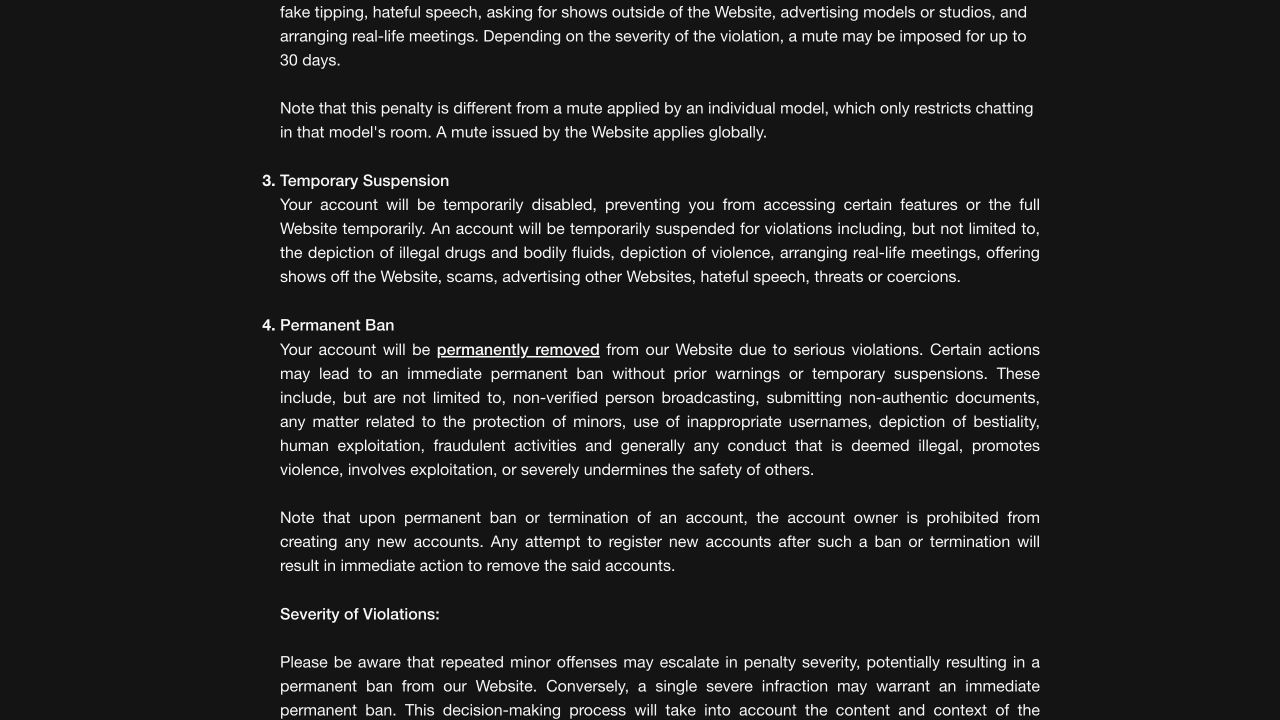
The rules do not promise that every case follows a warning-first sequence. Serious conduct can lead directly to a permanent ban, and repeated lesser violations can escalate. Ask about the action actually applied to your account rather than estimating a release date from another person’s experience.
A room ban is different from an account suspension
If you can use the site but cannot enter or interact in one room, read the message for that room. Stripchat’s room-ban guide says models control their rooms, with bans of 24 hours, 30 days or permanently. Lifting a model’s ban requires their permission.
Those options should not be used as a timetable for a platform block. Nor should you assume that support will override a model’s personal boundary. Respect the restriction and avoid using another account to continue contact.
If the incident also involves genuine harassment or another rule violation, report the conduct with the relevant evidence. Our reporting and blocking guide explains the distinction between asking the platform to investigate and controlling interaction within a room.
When only purchases or spending are disabled
The purchase/spend restriction article directs users to account verification to restore those functions. That is a specific instruction for this restriction, not a promise that verification overturns any moderation decision.
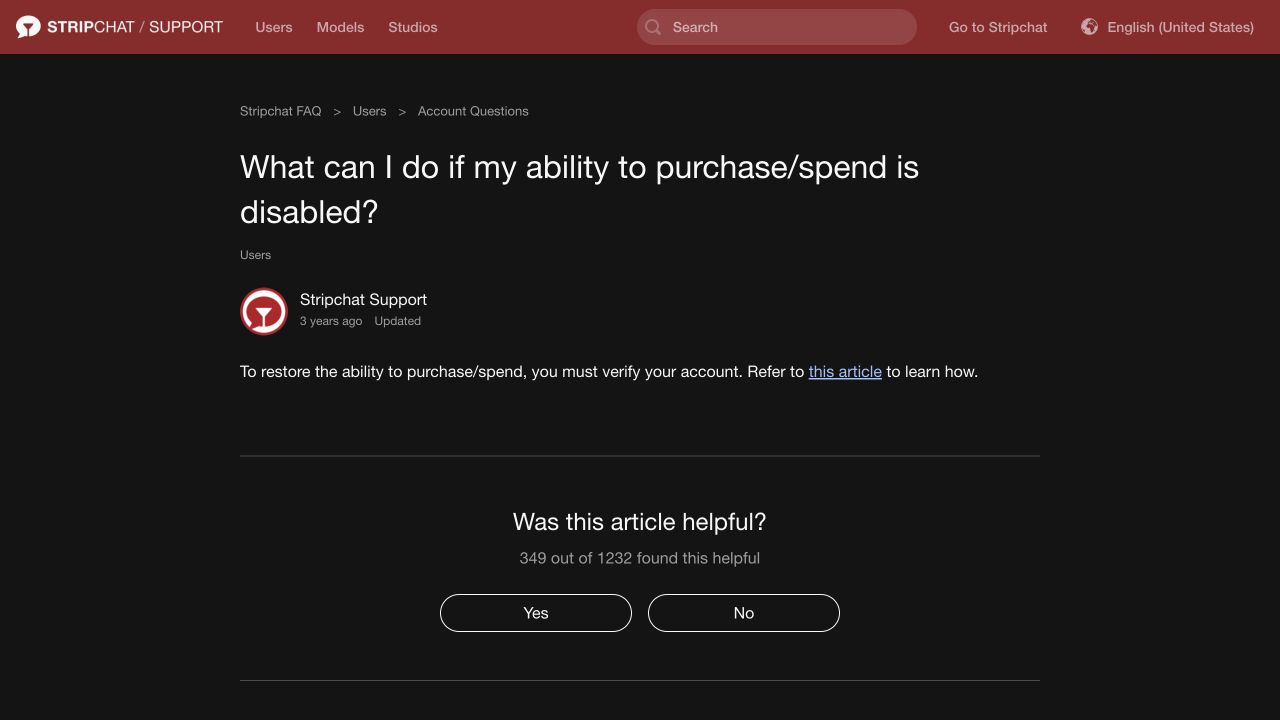
Follow the genuine account-verification process and check what is being requested before providing sensitive information. Our verification guide explains the account, ID and privacy questions. An unsolicited person offering to verify the account for a fee is not the same as a request inside the service’s own process.
A card decline or payment error also needs its own explanation. Compare the account notice with the processor’s result rather than repeatedly changing payment methods to test a restriction. The declined-payment guide covers that separate problem.
Read the reason before preparing an appeal
Start with the decision text. Save its date, reference, stated reason, affected function and any end date. Preserve the email and a readable screenshot of the notice, keeping private account details out of anything you share publicly.
The Terms of Use address matters such as harassment, impersonation, misuse of accounts, spam and interference with security features. The relevant question is which rule and incident the platform has identified in your case. Do not select an explanation from a general list simply because it sounds plausible.
Some rules concern broadcasting or uploaded content, while others apply to viewers’ messages and account use. If the notice seems to refer to an activity your account did not perform, identify that mismatch in the appeal and ask for clarification. Avoid copying a model’s document or earnings workflow into a viewer-account request.
If you know which action led to the notice, explain it accurately. If you believe the decision is mistaken, state what contradicts it. You can ask for the relevant time or content reference without inventing an admission or insisting that a guess is proven.
How to submit a Stripchat appeal
Stripchat’s appeal guide lists temporary and permanent account blocks among decisions with an appeal link in the notification email. It says the procedure applies to users, models and studios. Warnings and document rejections use Contact Support instead of that email-link route.
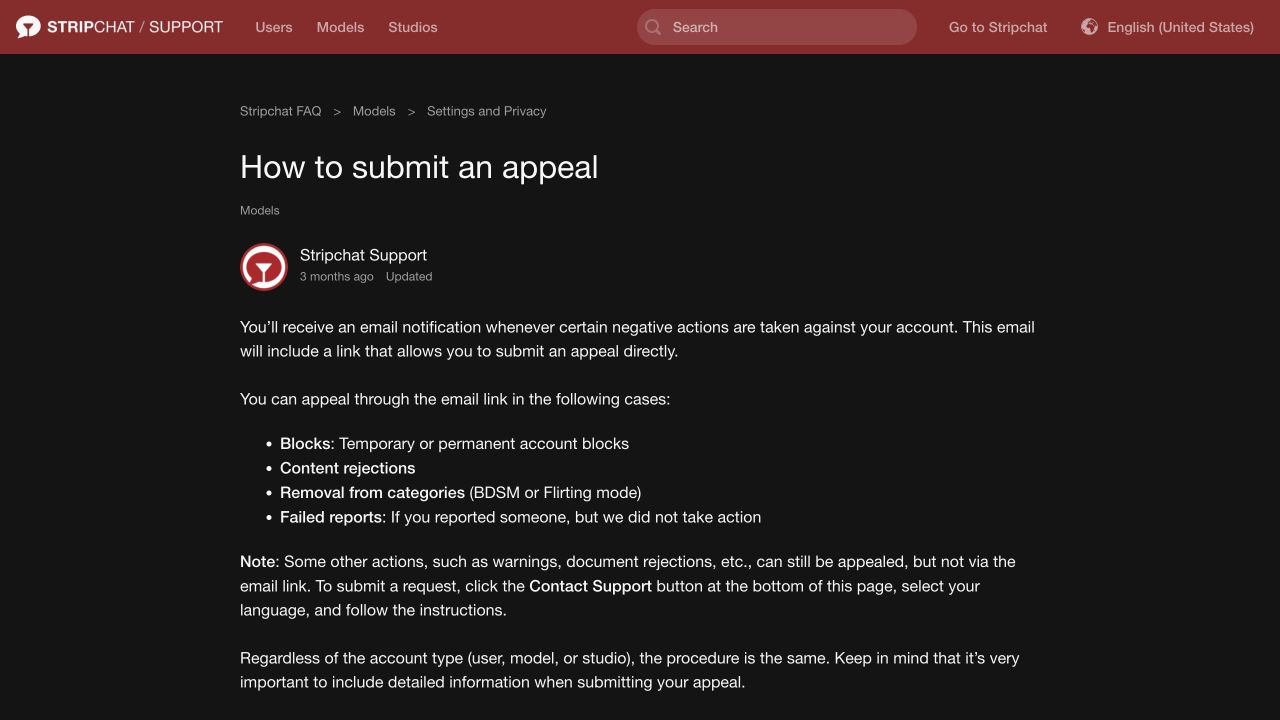
Use this sequence to organise your request:
- Check the decision. Confirm the username and restriction match the account concerned.
- Verify the route. Use the genuine decision’s instructions; if a message looks suspicious, ask through the official help centre before following it.
- Explain the point under review. Identify what you believe is wrong, incomplete or misunderstood.
- Provide relevant context. Include dates, message or content references and a short timeline where useful.
- State the outcome you request. Ask for review of the specified restriction and clarification of any conditions for restored access.
- Keep the case reference. Preserve the submitted explanation and later replies.
If you cannot find the email, check the registered mailbox and spam folder. If there is no usable link or you cannot access that mailbox, describe the situation through genuine support. The customer-support guide explains how to reach Contact Support and prepare the account details without using an unverified India phone or WhatsApp contact.
What to include in an appeal
A focused appeal connects the decision with the evidence. Put the account identifier and reference first, then address the disputed event. Several pages of unrelated purchase history can obscure the point you want reviewed.
Useful context may include:
- The notice and reference: the wording, date and restriction you are challenging.
- A short timeline: when the relevant activity occurred and when access changed, with the time zone.
- The disputed material: a message, content link or other record that helps identify the incident.
- The specific discrepancy: for example, a notice referring to an action you say did not occur on that account.
- Relevant security information: unexpected account changes or unfamiliar activity, clearly separated from assumptions.
Keep the original records. If a screenshot needs redaction, do not remove the relevant context or alter its meaning. Explain any redaction. Send only the material needed through the genuine process, keeping passwords, live codes, reset links and authenticator setup keys private.
If you accept that a rule was broken, describe what happened without minimising or embellishing it. Explain any steps already taken and ask what conditions apply. A promise to follow the rules is useful context, but it is not evidence that a restriction must be lifted.
An example appeal message
Adapt the following outline to the actual notice and facts:
Hello. I am requesting a review of the restriction on [username], decision/reference [reference], dated [date]. The notice states [brief reason]. I believe the decision needs review because [specific explanation]. The relevant event occurred on [date, time and time zone] in [room or content location]. The supporting context is [short factual summary and relevant links or records]. Please review this decision and confirm the scope of the restriction, any end date, and whether further information is needed from me.
If the reason is unclear, say so and ask which incident or rule is involved. If a statement is uncertain, mark it as uncertain. Do not reuse someone else’s successful appeal, transaction details or claimed explanation as if it described your own account.
Avoid sending repeated versions with conflicting stories. Correct a material error clearly in the existing case, identifying the earlier statement and the accurate information. A consistent, factual record gives the reviewer a better basis for a decision.
If you suspect someone else accessed the account
Unexpected messages, changed settings or an unfamiliar purchase may raise a separate security concern. Tell support what you observed, when you last controlled the account and which records you still have. Do not describe unauthorised access as established solely because the suspension was unexpected.
Protect the registered email and use genuine recovery or security controls where available. Our account-security guide covers passwords and authentication, while the recovery guide covers lost access. Changing a password should not be treated as an appeal outcome; ask separately about the restriction and any remaining sessions.
If the incident includes an unrecognised payment, contact the bank or payment provider promptly through an independently verified route. Keep that report separate from the moderation appeal, and describe accurately what you authorised or did not authorise.
Ask about tokens, payments and subscriptions separately
Record the balance and relevant transaction references if you can still access them normally. If you cannot, ask support which purchase and balance records can be provided through its process. Do not create another account or attempt to bypass the restriction to retrieve them.
Section 8 of the Terms of Use states that termination for a breach of the terms does not entitle the user to a refund of unused tokens. The condition concerns termination for a breach; it should not be turned into a claim that every temporary mute immediately forfeits a balance.
Ask whether the decision is temporary, permanent or still under review, what it means for the recorded balance, and which conditions apply to a particular purchase. A support request or appeal does not itself establish refund eligibility. The refund-policy guide explains the separate product conditions.
Also ask about the actual status of any recurring arrangement. Do not infer cancellation from loss of access, or assume a new charge will occur without checking the records. Our recurring-payment guide covers subscriptions, Auto-Refill and the confirmations to retain.
What happens after an appeal?
Follow the instructions and any timeframe in your own case. Stripchat’s complaint-handling policy describes reassessment of the content, initial decision and additional evidence, followed by a communicated outcome.
That policy specifies a six-month appeal period for a decision regarding a reported violation. It should not be assumed to replace the instructions for every type of account restriction. Submit a relevant appeal promptly and ask support if the applicable route or deadline is unclear.
Keep the distinction between an acknowledgement and a decision. If a reply asks for information, answer the specific question. If it redirects you to another process, retain the reference and explain the earlier contact rather than starting the story again without context.
If the appeal succeeds, check the confirmation and the status of the functions involved. If it is rejected, read the explanation and use any further route actually offered. Neither a permanent-block appeal nor a payment complaint should be presented as a guaranteed way to restore an account.
Can you create a new account instead?
The penalty rules expressly prohibit new accounts after a permanent ban or termination and say replacement accounts will be removed. The appropriate route is clarification or appeal of the decision.
Do not pay an “unban agent”, buy an account or install a tool claiming to remove the restriction. Someone outside the genuine process cannot establish their authority by showing a logo or a screenshot of a supposedly restored account. The scams guide covers recovery-fee and fake-support claims.
What about personal data after suspension?
Loss of access does not demonstrate that personal data has been erased. The Privacy Policy describes retention for necessary purposes and possible longer retention for legal, regulatory, accounting or complaint-related reasons. Data requests have conditions that depend on the circumstances and applicable law.
If you need information about retained records, raise a specific privacy request and distinguish it from your appeal. Ask which records can be supplied and what verification is necessary. The privacy guide covers those questions, and the account-deletion guide explains a different process. A restoration flow for an account you deleted should not be treated as a way to reverse a policy ban.
Frequently asked questions
How long does a Stripchat suspension last?
Read the notice or ask support for the end date and affected functions. The published maximum of 30 days concerns a website mute; it is not a general expiry date for account blocks.
Can a permanent block be appealed?
The appeal guide includes permanent account blocks in the email-link process. Requesting review does not guarantee reinstatement. Use the genuine decision’s instructions and provide relevant facts.
Does a failed login mean I was banned?
No. Check the exact error, account email and any decision notice. Password or authenticator problems need recovery; a moderation restriction needs the corresponding review route.
Will verification lift every restriction?
No such general conclusion follows from the purchase/spend guidance. Follow the requirement attached to your specific case and ask support whether another restriction remains.
Will an appeal return my unused tokens?
An appeal and a refund request address different questions. Ask about the balance and decision status; the terms contain a specific unused-token refund exclusion for termination due to a breach.
Can I open another account after a permanent ban?
The published rules prohibit replacement accounts after permanent bans or termination. Seek clarification or appeal rather than trying to work around the restriction.